LegalBox: AI that never leaves the building
A device that runs advanced models inside your firm's own network, on hardware you own. Confidential and privileged matter files never touch a public cloud, and no part of a question is sent to a third-party AI provider.
- GMKtec EVO X2
- AMD Ryzen AI Max+ 395
- 128 GB
- Zero egress
Network connected
Matter files
on your server
LegalBox
models on board
Public cloud
link up
BYTES SENT OUT: 0
Ask
Does the supply agreement let the buyer cancel late deliveries?
LegalBox · answered on device
Connected, and still nothing goes out. Pull the cable to prove it. Illustrative of the product on synthetic data.
Try it: pull the cable and watch the answer come back anyway.
Regulators have already said not to paste it into a chatbot
Australian courts and legal regulators have issued guidance cautioning practitioners against putting confidential or privileged client material into public AI tools. The reasoning is straightforward: once the text leaves your network, you no longer control who stores it, where it is stored, or what it is used for. Vendor assurances are contractual, not architectural.
Banned it, or used it anyway
Firms have split into two camps. Some banned AI outright: compliant, and slower than the firm across the road. Others use cloud AI quietly and carry a risk nobody has written down. Both camps are responding to the same missing option, which is a way to get the capability without the exposure.
The capability, without the exposure
On your premises
The device sits in your office, on your network, under your physical control. Nothing is rented from a data centre you have never seen.
Verifiable egress
Zero network egress is the default, not a setting buried in an admin panel. Your IT team can monitor the segment and confirm it themselves.
Grounded in your own sources
Answers are retrieved from the firm's own precedents, policies and matter material, with citations back to the source so a lawyer can check the work.
Owned, not subscribed
You buy the hardware. There is no per-seat cloud fee, no metered token bill, and no vendor who can change the terms on data you already handed over.
What's inside the box
Six modules, all running on the device. Matter management, questions with citations, redline comparison, tracked-change drafting, firm playbooks and access control.
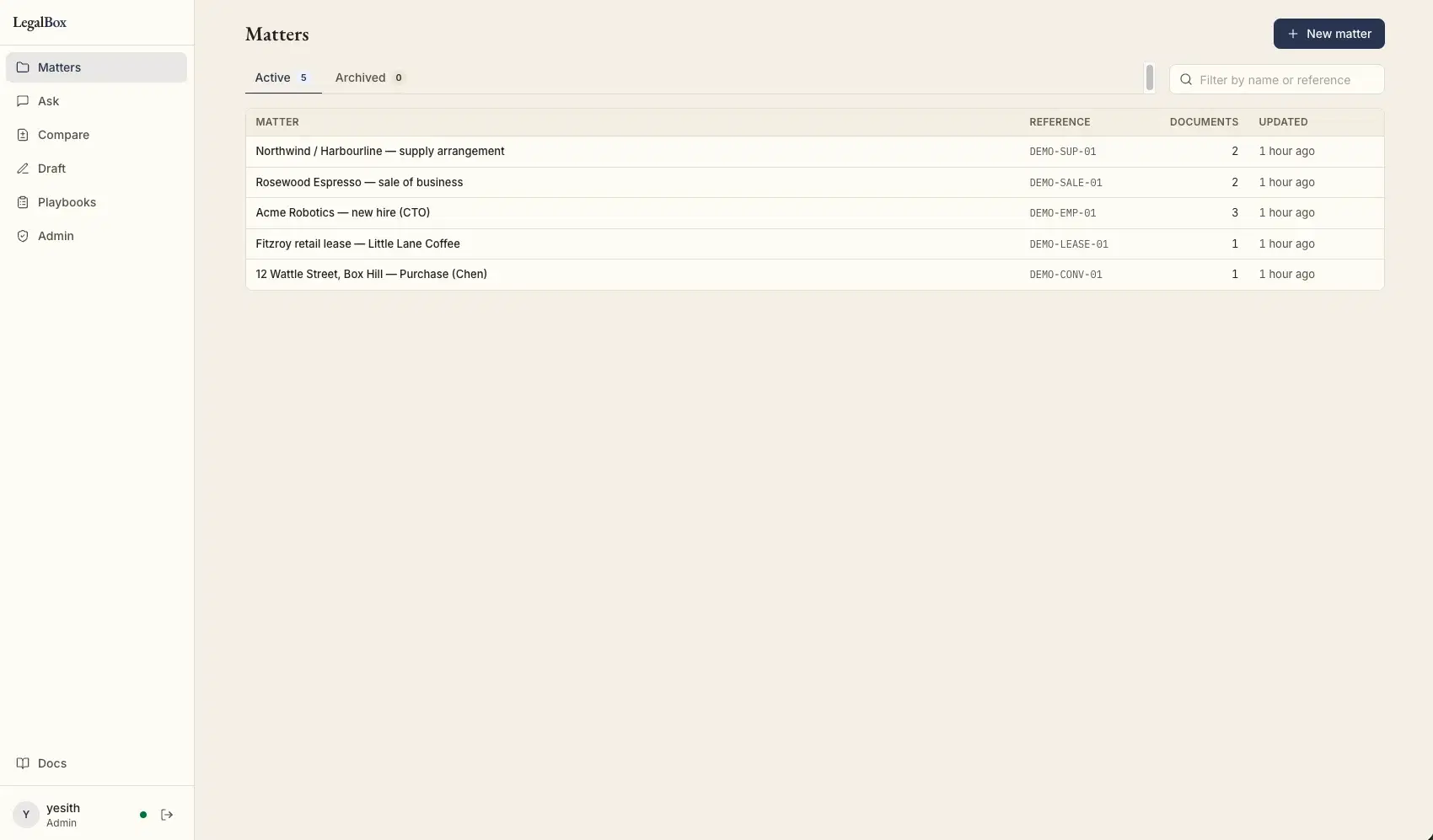
Matters
Work is organised by matter, the way the firm already thinks. Documents are attached to a matter and stay scoped to it.
Ask
Ask a question across a matter's documents and get an answer with citations back to the clause it came from, so it can be checked rather than trusted.
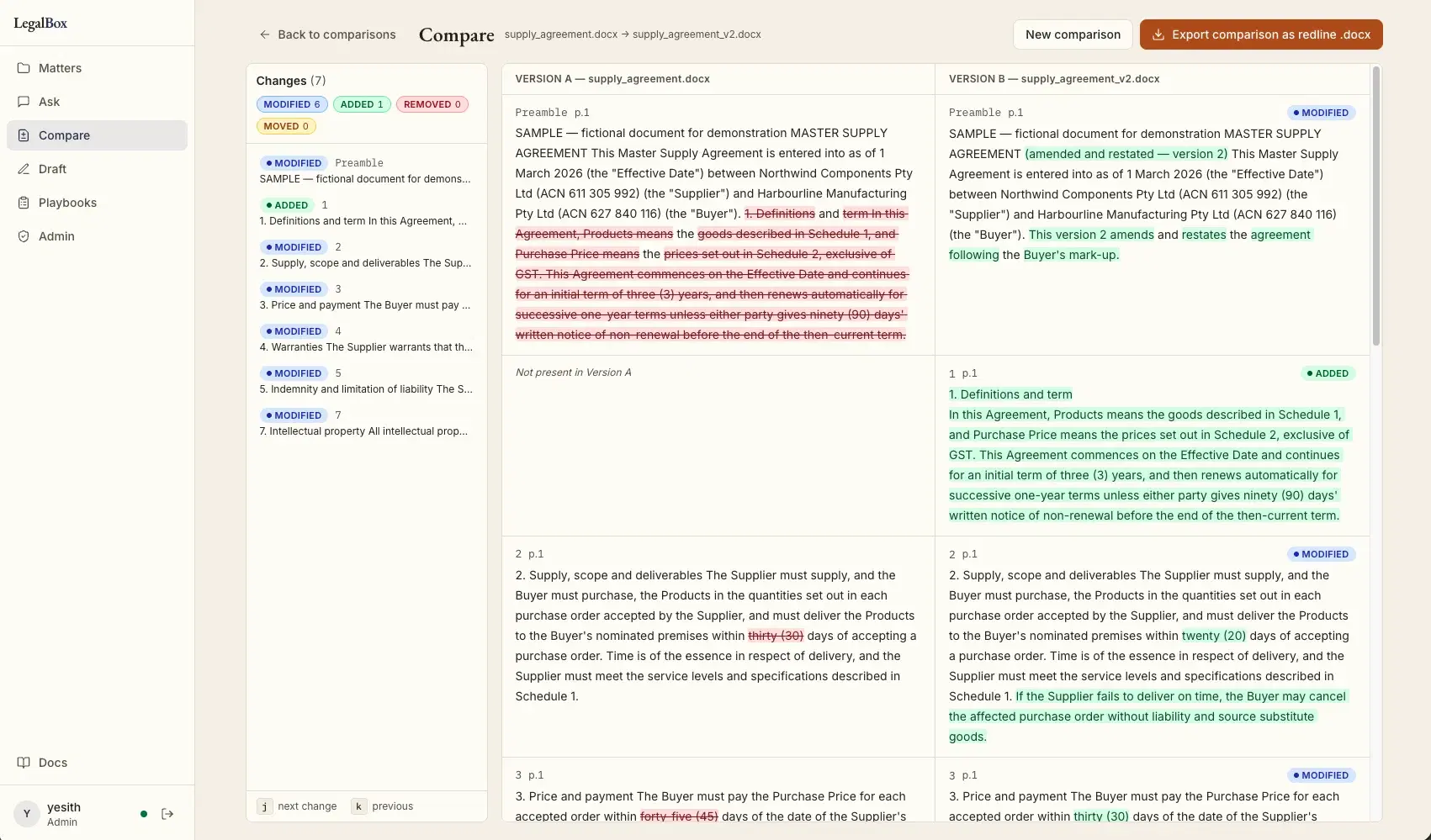
Compare
Diff two versions of an agreement clause by clause: modified, added, removed and moved. Export the comparison as a redline .docx.
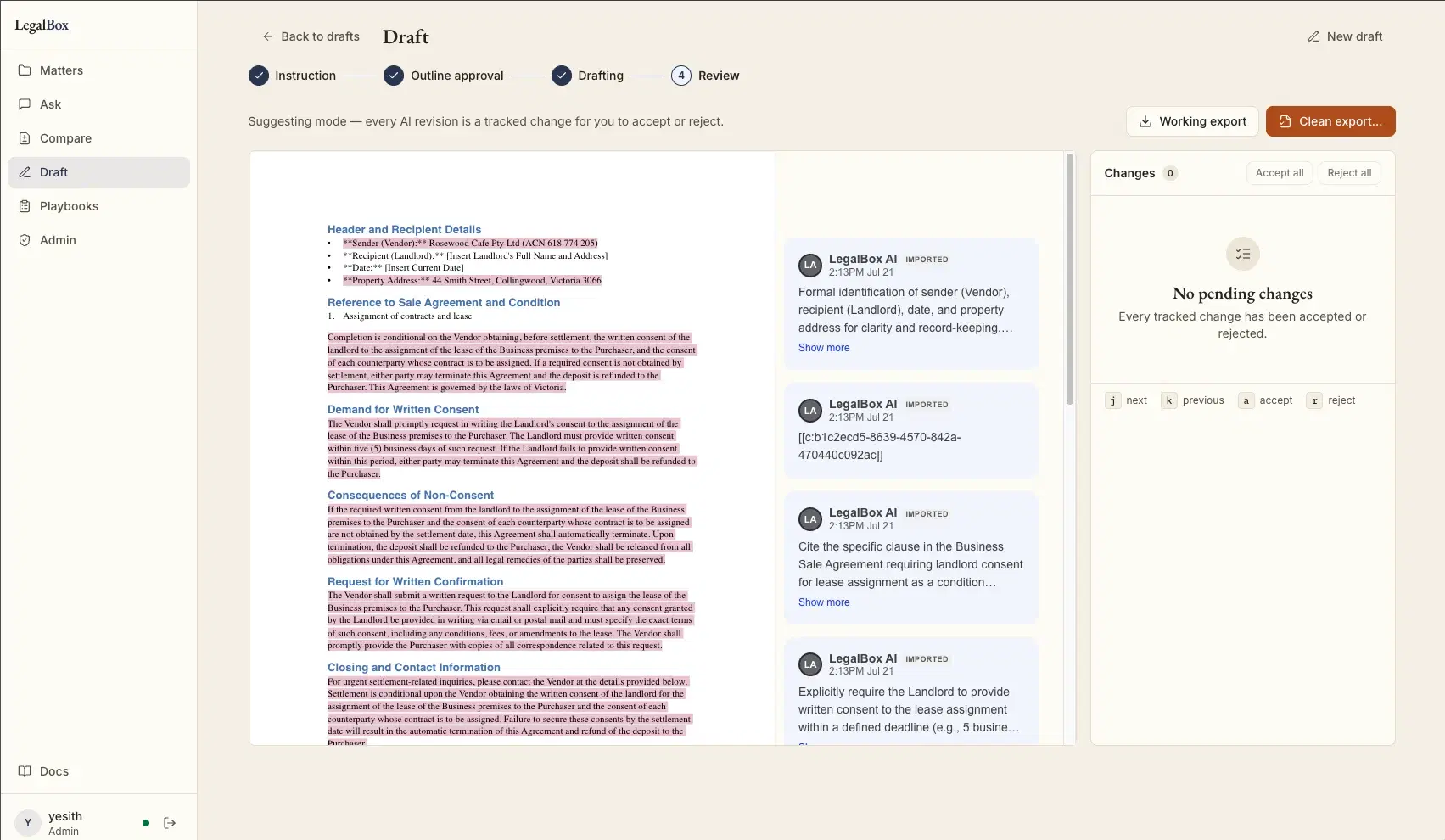
Draft
Instruction, outline approval, drafting, then review. Every AI revision arrives as a tracked change you accept or reject before it reaches the document.
Playbooks
Encode the firm's own positions and preferred clauses once, so drafting and review follow your standards instead of a generic template.
Admin
User and access control stays with the firm. There is no vendor console on the internet holding the keys to your matters.
The device, running
Screens from the demonstration unit. Every document shown is synthetic: fictional parties, fictional agreements, no client material.
“If your AI vendor can't survive you unplugging the cable, ask what's on the other end of it.”
It is a two-minute test and it does not require a security audit to run. We run it on our own device in front of you.
What sits in the comms cabinet
- Platform
- GMKtec EVO X2
- Processor
- AMD Ryzen AI Max+ 395
- Memory
- 128 GB unified
- Inference
- Local. No third-party LLM API
- Network
- Zero egress by default
- Ownership
- Hardware bought outright
This is the current demonstration device. Larger firms can be sized up; the architecture does not change.
Twenty minutes, and your IT team is invited
We send an architecture and security summary ahead of time so your IT team can read it before anyone talks about features. Then we demonstrate the device on synthetic data, and pull the cable while it is running so you can see what happens: nothing.
Book a walkthroughLegalBox is a working demonstration device today. Demonstrations use synthetic data, never real client material.
LegalBox FAQ
What is LegalBox?
LegalBox is an on-premises AI appliance built by Zatersio for Australian law firms. It is a physical device that sits inside your own network and runs the language models locally on its own hardware. There is no public cloud service behind it and no third-party LLM API call, so confidential and privileged matter files stay on your premises.
Does LegalBox need an internet connection to work?
No. Answering runs entirely on the device, so you can pull the network cable out and it keeps working. That is the test we run during the walkthrough, and it is the same test we suggest you run on any AI vendor: if the product cannot survive you unplugging the cable, something on the other end of it is receiving your data.
What can lawyers actually do with it?
LegalBox ships with six modules: Matters for organising work, Ask for questions answered with citations across a matter's documents, Compare for clause-by-clause redlines exportable as a .docx, Draft for tracked-change drafting a lawyer accepts or rejects, Playbooks for encoding the firm's own positions, and Admin for access control. All of it runs on the device.
Where do the answers come from?
LegalBox retrieves from your firm's own authority sources: the precedents, policies and matter material you point it at. Answers cite what they were drawn from so a lawyer can check the source rather than trust the output. The demonstration device runs on synthetic data, not real client material.
How can our IT team verify that nothing leaves the building?
The device ships with zero network egress as the default and is designed to be inspected rather than taken on trust. Your IT team gets an architecture and security summary before the walkthrough, can put the device on a monitored segment, watch the traffic themselves, and physically disconnect it mid-session while it keeps answering.
Is LegalBox a subscription?
No. The hardware is purchased outright and stays yours: there is no per-seat cloud fee and no metered token bill, because no tokens are being sent anywhere. Each firm's deployment is scoped and quoted after the walkthrough, once we know your data sources and how many people need access.
What hardware does LegalBox run on?
The current demonstration device is a GMKtec EVO X2 with an AMD Ryzen AI Max+ 395 processor and 128 GB of unified memory: enough to run capable models locally at usable speed in a unit that fits in a comms cabinet. Larger firms can be sized up; the architecture does not change.
Does LegalBox satisfy Australian regulatory guidance on AI?
Australian legal regulators have cautioned firms against uploading confidential client material to public AI platforms. LegalBox is built so that material never leaves your premises in the first place, which removes that specific exposure. Your professional and privacy obligations remain yours: we are engineers, not your legal or compliance advisers.